

Battery terminal corrosion can cause weak starts, electrical failures, and even complete battery failure. If your vehicle is slow to start or showing erratic electrical behavior, corroded terminals could be the problem.
Corrosion builds up over time due to battery acid leaks, humidity, or chemical reactions between the terminals and cables. Fortunately, checking and cleaning corroded terminals is a simple yet crucial maintenance task. This guide will walk you through identifying corrosion, cleaning it properly, and preventing future buildup to keep your battery in top condition.
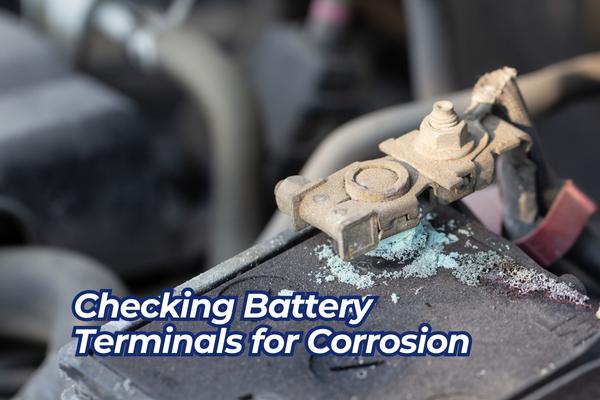
What Does Battery Corrosion Look Like?
Corrosion on battery terminals appears as a white, blue, or greenish powdery substance around the terminals or cables.It develops as a result of a chemical reaction between the metal terminals and the acidic fumes released by the battery.
In mild cases, corrosion may only coat the terminals. However, excessive buildup can spread to the battery cables, weakening the electrical connection and causing starting issues.
What Causes Battery Terminal Corrosion?
Several factors contribute to battery terminal corrosion:
- Hydrogen Gas Emission: Batteries naturally release hydrogen gas during charging, which reacts with surrounding metals, forming corrosion.
- Electrolyte Leakage: If the battery leaks acid, it accelerates corrosion around the terminals.
- Overcharging or Undercharging: Excessive or insufficient voltage can alter the battery’s chemical balance, increasing the risk of terminal buildup.
- Poor Ventilation: Inadequate airflow around the battery can trap moisture, leading to accelerated corrosion.
- Age of the Battery: Older batteries tend to corrode more frequently due to natural wear and tear.
Signs of Corroded Battery Terminals
Corrosion on battery terminals can cause several performance issues. Common symptoms include:
- Slow engine cranking: Corrosion restricts the flow of electricity, making it harder for the starter motor to engage.
- Dim or flickering lights: Poor battery connections affect the power supply to headlights and dashboard indicators.
- Clicking sound when starting: If the battery struggles to send enough power to the starter, you may hear clicking instead of the engine turning over.
- Frequent battery drain: A poor connection forces the battery to work harder, leading to faster depletion.
- Malfunctioning electronics: Unstable electrical supply can cause issues with power windows, radio, or dashboard displays.
If you notice these symptoms, it’s time to check the battery terminals for corrosion.
How to Check and Clean Corroded Battery Terminals
If you suspect battery terminal corrosion, follow these steps to inspect and clean the terminals safely.
Step 1: Gather the Necessary Tools
Before starting, make sure you have the right tools:
- Safety gloves and protective eyewear
- Baking soda or battery terminal cleaner
- A cup of water and an old toothbrush
- A wrench or socket set (to loosen battery clamps)
- A wire brush or sandpaper
- Petroleum jelly or anti-corrosion spray
Step 2: Inspect the Battery Terminals
- Turn off the vehicle and remove the key from the ignition.
- Open the hood and locate the battery.
- Look for signs of corrosion around the positive (+) and negative (-) terminals.
- If corrosion is present, check if it has spread to the battery cables.
If the buildup is minor, cleaning should restore proper function. However, excessive corrosion may indicate a deeper battery issue, requiring professional inspection.
Step 3: Safely Remove Battery Cables
- Always disconnect the negative terminal (-) first to prevent accidental short circuits.
- Loosen the clamp using a wrench and carefully lift it off the terminal.
- Repeat the process for the positive terminal (+).
- Avoid touching both terminals simultaneously to prevent electrical shocks.
Step 4: Clean the Corrosion Off the Terminals
- Mix baking soda with water to form a paste.
- Spread the paste over the corroded areas with an old toothbrush.
- Let the solution sit for a few minutes as it neutralizes the acid buildup.
- Scrub the terminals and cable clamps with a wire brush until all corrosion is removed.
- Rinse with clean water and dry thoroughly with a rag.
If using a commercial battery cleaner, follow the manufacturer’s instructions.
Step 5: Reconnect and Protect the Battery Terminals
- Apply petroleum jelly or anti-corrosion spray to the terminals to prevent future buildup.
- Reconnect the positive terminal (+) first, followed by the negative terminal (-).
- Tighten the clamps securely but avoid overtightening, which can damage the battery posts.
- Start the engine and check if the battery performs normally.
Regular maintenance can prevent corrosion from returning and ensure a strong electrical connection.
Case Study: Resolving a No-Start Issue Due to Corrosion
David’s car wouldn’t start one morning, and he noticed a thick layer of white corrosion on the battery terminals. After removing the cables, he used baking soda and a wire brush to clean the terminals. He then applied petroleum jelly before reconnecting the battery. Once he restarted the car, the engine turned over smoothly. By performing this simple maintenance, David avoided a costly battery replacement and restored his vehicle’s performance.
Conclusion
Checking battery terminals for corrosion is a simple but essential maintenance task that can prevent starting issues, electrical failures, and premature battery wear. Regular inspections and cleanings ensure a strong battery connection and extend its lifespan.
By following the steps in this guide, you can diagnose, clean, and prevent battery terminal corrosion, keeping your vehicle running smoothly.
Want more car maintenance tips? 🚘⚙️ Explore our other guides, like “Fixing Malfunctioning Turn Signals,” to keep your vehicle in top condition!
FAQs About Checking Battery Terminals for Corrosion
1. How often should I check my battery terminals for corrosion?
It’s a good idea to inspect your battery terminals every three to six months as part of routine vehicle maintenance.
2. Do corroded battery terminals cause battery drain?
Yes, corroded terminals increase electrical resistance, forcing the battery to work harder and depleting its charge more quickly. Regularly cleaning the terminals ensures a strong connection and helps maintain battery efficiency.
3. What’s the best way to prevent battery corrosion?
Applying petroleum jelly, dielectric grease, or anti-corrosion spray to the terminals can help prevent future buildup. Also, ensure the battery is properly charged and secured in place.
4. Can I use vinegar instead of baking soda to clean corrosion?
Yes, vinegar can dissolve corrosion, but baking soda is more effective at neutralizing battery acid. Both methods work, but baking soda is the preferred option.
5. When should I replace a corroded battery?
If corrosion keeps returning despite regular cleaning, or if the battery struggles to hold a charge, it may be time to replace it. Most car batteries last 3 to 5 years before needing replacement.